cat work/ziga-data.md
Ziga Data: lead-capture SaaS that turns messy text into a clean Google Sheet
- role:
- Solo founder and engineer
- stack:
- Go · SQLite · React · OpenAI · Google OAuth · Google Sheets API · Hetzner · Cloudflare
Visit the live product ↗ View the source ↗
Problem and constraints
Leads arrive as a mess. A DM on X, a forwarded email, a screenshot of a WhatsApp chat, a note scribbled after a call. Somebody then retypes all of it into a spreadsheet by hand, one field at a time, and it is exactly the kind of boring work that quietly eats an afternoon and gets done late or not at all.
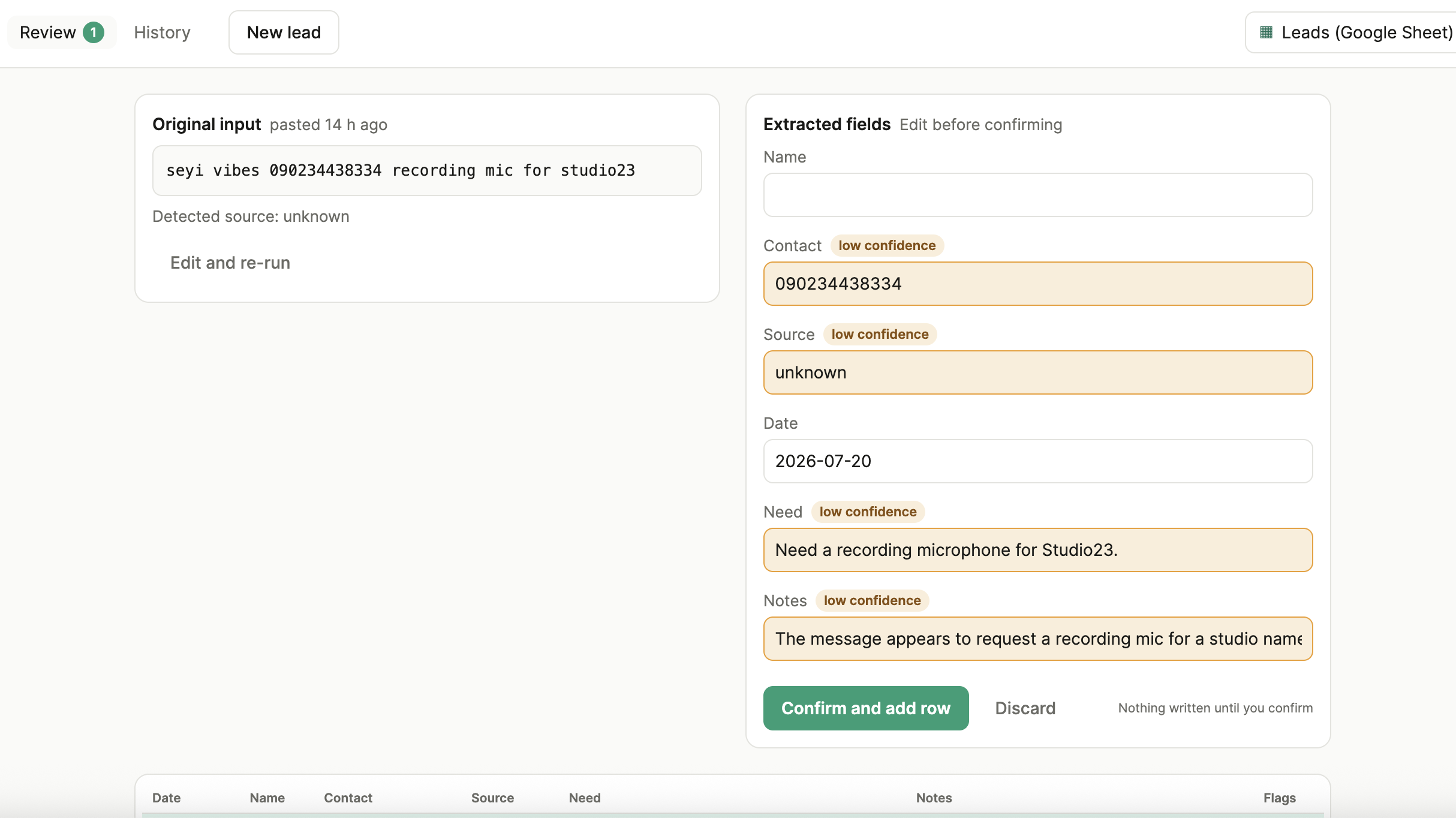
Ziga Data removes the retyping. You paste the raw lead, or forward it, or drop in a screenshot. An LLM pulls out the name, contact, source, and what the person wants. You see every field before anything is saved, fix whatever looks off, and confirm. The row lands in a Google Sheet you own. Nothing is written until you approve it.
I built it alone, under real constraints:
- Solo developer. The same rule as everything I ship: boring technology, minimal moving parts, no infrastructure I would have to babysit at 3am.
- It touches other people’s data. A lead is somebody’s name and contact details. Every design choice around storage, isolation, and access had to assume real personal data from the first line of code, not as a later hardening pass.
- The data has to end up somewhere the user already trusts. Not locked in my dashboard. The whole promise is that leads flow into the customer’s own spreadsheet, in their own Google account, that they control and I never hold long-term.
Key decisions
One Go binary with the frontend embedded
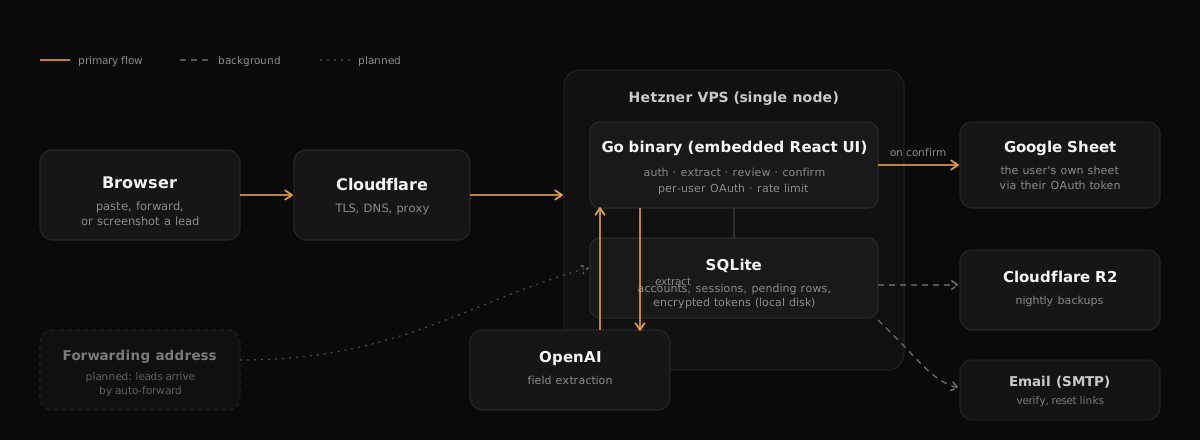
Decision: the React frontend is compiled and embedded directly into the Go binary. One file ships the API and the entire UI.
Why: there is no separate frontend to deploy, no version skew between a UI on one host and an API on another, no CORS layer to maintain. Deploy is copying one binary and restarting one service. The exact bytes that get tested are the exact bytes that ship.
Tradeoff: a change to a single line of CSS means rebuilding the binary. For a solo operator shipping a whole product, that is a fine price for never debugging a frontend/backend mismatch in production.
Review-first: the AI drafts, the human decides
Decision: extraction never writes to the sheet directly. It produces a pending row with per-field confidence, and a human confirms before anything is saved.
Why: LLM extraction is fallible, and a silent wrong value in someone’s records is worse than making them paste it themselves. Low-confidence fields are highlighted, missing required fields are flagged, and the user edits inline before confirming. The trust comes from the human staying in the loop, not from pretending the model is always right.
Tradeoff: it is not fully hands-off yet. That is deliberate for now; the automation ladder (auto-approve high-confidence rows) is a setting to earn once users trust the output, not a default to ship on day one.
Each customer writes to their own Google Sheet
Decision: multi-tenant from the ground up. Every user connects their own Google account, and confirmed rows are written to a sheet they own, using their own OAuth token.
Why: the product should never be the place your leads are trapped. Your data lives in your Google account. If you stopped using Ziga tomorrow, every row is already yours, where you keep everything else.
Tradeoff: this is far more work than one shared spreadsheet. Per-user OAuth, encrypted token storage, token refresh, and strict per-tenant data isolation all had to exist before the first real user. The isolation is enforced at every endpoint and tested directly: one user’s data is invisible to another, and a cross-user access attempt returns a 404, not even a 403, so IDs can’t be probed.
The narrow Google permission, on purpose
Decision: request only the drive.file scope, which grants access solely to sheets the app creates or the user explicitly picks. Never broad access to a user’s Drive.
Why: it is the honest amount of access for what the tool does, and it is what I would want a tool to ask of me. It also keeps Google verification light, which matters for a solo product with no compliance team.
Tradeoff: the app cannot freely browse your existing spreadsheets. To use one you already have, you select it through Google’s own file picker, which grants access to just that file. Slightly more friction, dramatically less access, and I think that is the right trade for data this personal.
SQLite and nightly backups you can actually restore
Decision: SQLite as the only local state, backed up nightly to Cloudflare R2, with the restore path tested before launch, not assumed.
Why: the database holds accounts, sessions, and encrypted Google tokens. It is the one thing that must survive. A single node with a single file is simple to reason about and simple to back up. A backup you have never restored is a guess, so I pulled a backup, rebuilt the database from it, and checked its integrity before trusting it.
Tradeoff: no horizontal scaling story. For this workload, that ceiling is years away, and reaching it would be a good problem.
The hard part: the Google Picker that let the browser in but not the server
Auto-creating a sheet worked on the first try. Letting a user attach a sheet they already owned did not, and the failure was quietly confusing: the file picker opened, the user selected their spreadsheet, the browser could clearly read it, and then the server got a 404 trying to write to it. Same file, same account, two different answers depending on who was asking.
The cause is a real subtlety of how drive.file works with the Google Picker. The Picker was built with an OAuth token and a developer key, but without the app’s Cloud project number attached to it. Without that, the per-file grant the user just made was not attributed to the application. So the short-lived token in the browser could see the file, but the app’s own stored credential, the one that does the actual writing on the server, was never granted access. The pick succeeded and the write failed, which is the most confusing shape a bug can take.
The fix was to attach the project number to the Picker so the grant lands on the application, not just the browser session, and, just as importantly, to log the real Google API error on failure instead of a generic message. A 404 versus a 403 there is the entire diagnosis: 404 means the server genuinely cannot see the file, which points straight at the grant, not at permissions.
Two lessons. First, when a browser-side action and a server-side action share one OAuth client, they still do not automatically share access, and the gap is invisible until you log the underlying error. Second, a “success” in the UI that fails on the backend is worth designing against directly: surface the real error somewhere you can read it, or you will debug by guessing.
The limitation I ship with
Today, leads still have to be brought to Ziga. You paste them, forward them, or drop in a screenshot. It does not yet watch an inbox for you. The feature that changes that, a personal forwarding address plus auto-forward rules so leads arrive with zero manual steps, is the next real build. I would rather say that plainly than imply the tool is more hands-off than it is today.
Results and lessons
- Shipped and live, solo: a multi-tenant SaaS with per-user Google OAuth, encrypted token storage, tested per-tenant isolation, real transactional email, and proven, restorable backups, all on a single VPS it shares with another product.
- [PLACEHOLDER — update at launch: early users, first leads processed, any launch-week numbers, same style as the hookdrop metrics.]
What I took away:
- The unglamorous last 10% is the real work. The extraction demo was working early. Auth, per-user isolation, email delivery, backups, TLS, and the deploy path were most of the actual effort, and they are what separate a demo from a product someone can trust with their data.
- Narrow permissions are a feature, not a compromise. Asking for the least access the job needs is both the right thing and an easier path through verification. Users notice what you ask for.
- Design against silent failure. The bugs that cost the most time all looked like success from the outside: a config that booted “healthy” with the write path disabled, a picker that worked in the browser and failed on the server. Making failures loud and legible was worth more than any feature.